
 OfferEasy
/ 选学校
/ 新西兰大学
/ 奥克兰大学
OfferEasy
/ 选学校
/ 新西兰大学
/ 奥克兰大学

新-UP Education - 奥克兰大学国际学院(奥大预科)-奥克兰大学预科(加速)课程2026年2月入学迎新指导邀请函
阅读:132次 添加时间:2025-12-31 编辑: admin
------------------ Original ------------------
Kia ora tatou, (hi everyone)
Welcome to University of Auckland International College. We are excited you have chosen to study with us! This email contains a few important information to be aware of at the start of your studies.
Orientation events
It is COMPULSORY that all new students participate in all orientation activities. For the details of the orientation schedule, please click here for UoA Accelerated + Post Foundation. If you missed any orientation session, the recording will be available on Blackboard after orientation week.
Subject Selection
It is important that you read the guidelines when selecting the subjects, click here. Subject selections MUST be completed by Wednesday 28th January at 11:59 PM NZT. If you wish to change your subjects, the deadline will be on Friday 6th February. While we strive to accommodate your preferences, selected subjects may not be guaranteed due to availability and your University Degree Pathway Programme. Acceptance into subjects is done on a needs’ and first-come-first-served basis. Don’t miss out – get your subject selection done as soon as possible.
Visas for International Students
As an international student in New Zealand, you MUST have a valid visa to study. Students MUST provide a copy of their visa to adminservices@up.education as soon as their visa is granted.
Passport
All students MUST bring their original passport on the first day of orientation to complete the registration.
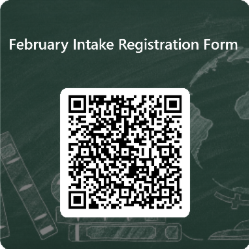
Registration Form
The form MUST be completed and be filled out in English.
Click here to submit or scan the QR code below.

Your school account
It is important that you set-up your school account so you can access the essential online platforms you will need such as SELMA and Blackboard. They are our online platforms that holds the timetable, all information, and materials relevant to your studies. Please ensure your login is activated before you start the programme. Please note that your log-in details will not work if you have not made your payment, or if you have just made your payment without receiving your official receipt.
The link to set your login is https://portal.office.com
Username 270xxxxx@upstudent.org (Your student ID number can be found on the offer letter. Your username will be Student ID number + @upstudent.org)
How to setup your school account instructions are attached.
If you have any questions regarding the login, please contact adminservices@up.education
Microsoft Teams
Microsoft Teams is the primary tool for online delivery, along with email, through which staff will communicate with you. Students must set up Microsoft Teams on their devices before starting their studies. For information on how to install Teams, please refer to the Orientation landing page.
Communications
If you send an email to any of our teams, please make sure that you include your student ID and your full name. Not including this information is putting your email at risk of not being replied to on time.
Period Schedule
Below is a guide for you to understand what your timetable will look like. You will learn more about your schedule as you attend your Orientation sessions with your programme leaders.
Always remember to refer to your timetable on SELMA
Verkada Pass
Our campus uses Verkada Pass to provide a safe and secure environment for all students, staff, and visitors.
As a student, you will use your mobile phone as a contactless key to access secure buildings or rooms. The Verkada Pass app on your smartphone, serves as your digital key. When you approach a secured door, just open the app or use the phone's Bluetooth to gain access.
This system also helps track who enters specific buildings at any given time, allowing us to maintain a safe campus by identifying and responding to any unauthorized access.
We are looking forward to meeting you on campus soon.
Nāku noa, nā
University of Auckland International College
推荐导师 换一批





院校推荐 换一批