
 OfferEasy
/ 选学校
/ 新西兰大学
/ 奥塔哥大学
OfferEasy
/ 选学校
/ 新西兰大学
/ 奥塔哥大学

新-奥塔哥大学-收到2026年无条件录取通知书的下一步措施
阅读:107次 添加时间:2026-01-30 编辑: admin
------------------ Original ------------------
Kia ora (Hello),
Congratulations on receiving an unconditional offer from the University of Otago – New Zealand's first university, home to one of the world’s Top 5 most beautiful campuses!
We are thrilled to welcome you to the Otago community and look forward to seeing you on campus soon! □
This email outlines the next steps you need to take after receiving your full offer.
Essential Next Steps
1. 接收录取通知书 | Accept Your Full Offer
Secure your place at Otago by accepting your offer:
Check your Offer of Place letter in your eVision alerts
Click Accept Offer
2. 支付学费 | Pay Your Tuition Fee
You must pay your full tuition fee before submitting your student visa application.
If you haven’t paid your tuition fee, we strongly advise you to pay your tuition fee asap to ensure sufficient time for student visa processing
The tuition amount is listed in your Offer of Place (note: pay the full amount, not a deposit)
Payment methods (NZD):
Bank Transfer
□ 计划于2026年2月入学的新生,如您还未完成支付流程,请在近期内完成学费缴纳,以便预留充足的学生签证办理时间。
3. 获取学费收据回执 | Request Tuition Fee Receipt (Required for Visa Application)
Tuition fee receipt: ESSENTIAL STEP TO APPLY FOR STUDENT VISA
Steps to request a tuition fee receipt as an international student:
Log in to eVision.
Click Request tuition fee receipt from either the My Finances container or the Finance menu.
Select the academic year they are requesting the receipt for from the drop-down menu.
Click Request receipt.
Click Exit and check your eVision alert to download the receipt.
□ 详情请见奥塔哥大学微信公众号文章:https://mp.weixin.qq.com/s/odbXNptDWO1b9rGtry_GJA
4. 学生签证申请 | Apply for Your Student Visa 请即刻申请
All international students must have a visa valid for study at the University of Otago, with the correct location of campus and programme of study specified.
Avoid delays in processing the application: Why some applications are processed faster than others | Immigration New Zealand
Check your visa application status: Checking your visa application status | Immigration New Zealand
Check emails regularly, including spam/junk folders, in case INZ requests more information. If an Immigration Adviser or education consultant (agent) applies on your behalf, keep in regular contact with them.
If you have questions, you can contact INZ here or our Student Visa Services team at student.visa@otago.ac.nz.
More details: https://www.otago.ac.nz/international/visas
□ 详情请见奥塔哥大学微信公众号文章: https://mp.weixin.qq.com/s/_stu0q-VeTK9px6hEyNmdQ
5. 选课|Select Your Papers
If you haven’t already, select your papers via your eVision account as soon as possible, via your eVision account.
Having your papers selected and course approved now speeds up your final enrolment process when you arrive at Otago and allows you to get your student ID and access to resources more efficiently. Remember, it is still possible to make changes in the first couple of weeks if you need to. When selecting courses, keep in mind any specific course requirements for your degree major at Otago.
If you are undergraduate student, please contact our Student Development advisors (degree planning) if you need help – email student.development@otago.ac.nz with the subject line “New international student course advice semester 1 2026”.
If you are a postgraduate student unsure about your paper selection, please directly contact the Postgraduate Programme Coordinator or Director for advice.
□Handy tip: when you go to select your papers in eVision, there is a field asking for your visa details. Please be assured that you can still proceed with your paper selection without the visa details.
6. 请注册报名迎新讲座 (到校后参加)
Sign up for the Orientation Seminar!
All international students must attend an Orientation and Enrollment seminar before the start of their studies. This is a compulsory seminar, where you will present your passport and student visa to complete your enrolment. Remember to register here!
If you have not yet registered for an orientation seminar, please do so now – this is important so we know when to expect you.
Once you have your student visa, please email a high-quality PDF scan of your passport bio page and facing page AND the pdf of your visa once you have received it from Immigration New Zealand to <a href="mailto:international.orientation@otago.ac.nz" title=" international.orientation@otago.ac.nz so we can expedite your declaration process once you arrive at Otago. Please write your full legal name and student ID number in the email so that we can identify you.
You must bring your passport to the seminar with you and have it ready to present at the attendance desk. For any questions, please contact <a href="mailto:international.orientation@otago.ac.nz" title=" international.orientation@otago.ac.nz.
请报名参加迎新讲座,这是硬性要求参加的活动,学生报到的必备步骤。
7.重要日期及晚到学生报到
Late Arrivals:
Please reply this email or email international.orientation@otago.ac.nz if circumstances mean that you cannot arrive in time to start classes. Include the subject “Late Arrival” AND your Otago student ID in the subject line of your email.
Information will be provided regarding the last dates to complete enrolment for specific programmes of study, and on procedures for deferring to the next available intake if necessary. Make sure you also keep your accommmodation provider updated.
如有特殊情况需要晚报到的学生,请回复本邮件告知你的晚到计划,您将收到进一步晚到流程说明。
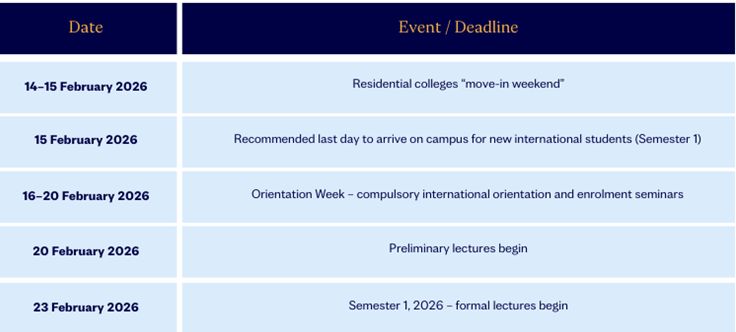
Key Dates
We are less than one month before the start of Semester 1/ February intake 2026. Please note the following key dates:
8.加入奥塔哥新生微信群 | Join the 2026 Otago Chinese Student WeChat Group
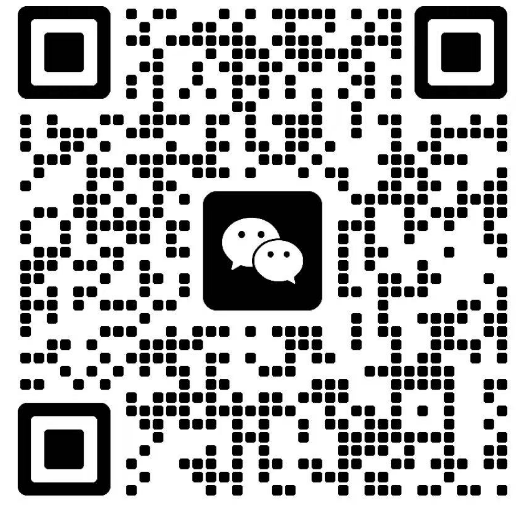
We are creating a WeChat group for Chinese international students who will begin their studies in 2026.
Joining the group will allow you to connect with other students, ask questions, and receive support directly from our team.
To join, please scan my WeChat QR code below. If you have any questions about your next enrolment steps, please feel free to reach out.
I hope the information above is helpful. Please do not hesitate to contact me if you have any questions
Ngā mihi nui - Kind regards,
| International Student Recruitment Coordinator |


推荐导师 换一批





院校推荐 换一批